
Intro
Working with raw timestamps is not user-friendly.
Instead of showing dates like “2024-05-10 10:15:43”,
we can display them in a more readable way:
– 5 minutes ago
– 2 days ago
– in 3 months
This is called relative time formatting.
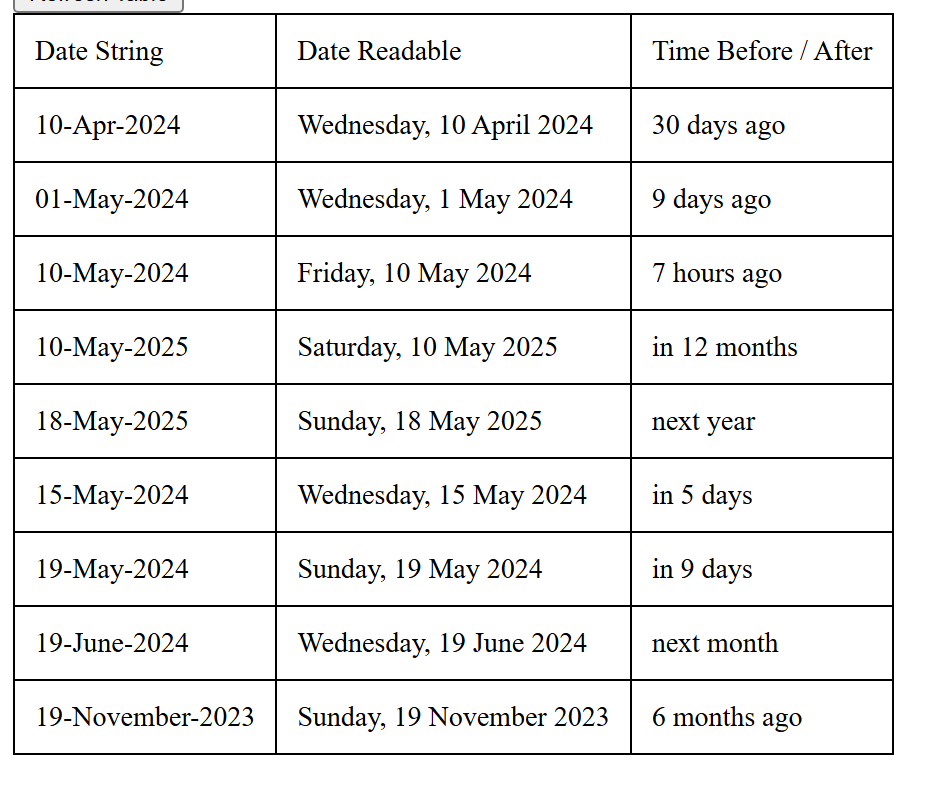
Example Ouput
let us say today is 15-Apr-2026 and we send the input date string, the api will return date readable
| Input Date String | Date Readable | Time Before / After |
| 10-Apr-2025 | Thursday, 10 April 2025 | last year |
| 20-May-2025 | Tuesday, 20 May 2025 | 11 months ago |
| 10-Mar-2026 | Tuesday, 10 March 2026 | last month |
| 20-Mar-2026 | Friday, 20 March 2026 | 26 days ago |
| 10-Apr-2026 | Friday, 10 April 2026 | 5 days ago |
| 22-Apr-2026 | Wednesday, 22 April 2026 | in 7 days |
| 10-May-2026 | Sunday, 10 May 2026 | in 25 days |
| 20-May-2026 | Wednesday, 20 May 2026 | next month |
| 10-Apr-2027 | Saturday, 10 April 2027 | in 12 months |
| 20-Apr-2027 | Tuesday, 20 April 2027 | next year |
Try it yourself
Enter any date and see how it converts into relative time.
How it works
We calculate the difference between the current time and the given date.
Then we convert that difference into units like seconds, minutes, hours, days, months, or years.
Finally, we format it into readable text like “2 hours ago” or “in 5 days”.
Code Example
function getTimeAgo(dateStr) {
  const relativeTime = new RelativeTime(); // defaults to OS localen
  let dateObj = new Date(dateStr);
  return relativeTime.from(dateObj);
}We can use JavaScript to convert a date into a readable relative time format.
For example, “2024-05-10T01:25:14.317Z” is less readable than “7 hours ago”.
I have used the relative-time library to simplify this conversion:
https://github.com/yairEO/relative-time
Full code available here:
https://github.com/khalilahmed232/khalilahmed232/tree/main/plain/date-time-ago
This makes date display much more user-friendly in real applications.
Using relative time formatting makes applications feel more modern and user-friendly, especially for feeds, comments, and activity logs.