Building User-Friendly Web Apps

Building a web app isn’t just about features. It’s about how users interact with it. A good app should feel natural, predictable, and easy to use. Small usability improvements often make a big difference in how people experience your product.


Navigation Enhancements

Make Pages Easy to Bookmark

Update the URL to reflect the current state when users search, filter, or view specific content. This allows them to return to the same place without repeating steps.

  • Example:

    • Before: User searches for “Vehicle XYZ”
    • After: khalil232.com/someapp/search?query=Vehicle+XYZ

This saves time and makes your app feel more reliable.

Support Deep Linking

Allow users to open specific records, sections, or screens directly using a URL. This avoids repetitive navigation.

  • Example:

    • khalil232.com/someapp/vehicle/12345

Deep linking is especially useful in business apps where users frequently revisit or share specific records.

Respect User Actions

Avoid Restricting Basic Functionalities

Do not block basic browser actions like cut, copy, or paste. Users expect these to work everywhere.

  • Avoid:

    • Disabling right-click
    • Preventing text selection

Blocking these actions creates frustration and breaks normal user behavior.

Non-Blocking Processes

Do vs Don't blocking ui example

Reduce Blocking Actions

Full-screen loaders and blocking overlays interrupt users and slow them down. Instead, allow them to continue working.

  • Better approaches:

    • Run tasks in the background
    • Keep screens interactive
    • Show completion using notifications or toasts

Example

While generating a report, let users continue using the app. Notify them when the report is ready to download.

This keeps the app responsive and efficient.

Visual Clarity

Make Links Visually Distinct

Do vs Don't link example

Links should clearly look clickable. Use color, underline, or icons to differentiate them from normal text.

  • Example:

    • Blue, underlined text for links

Clear visual cues improve navigation and reduce confusion.

Confirm Difficult Actions

Always confirm actions that cannot be undone, such as deleting data.

Delete popup example

  • Example:

    • “This action will permanently delete your record. Do you want to continue?”

This prevents mistakes and gives users confidence.

Data Management

Manage Text Length in Tables or Lists

Long text can break layouts and reduce readability. Handle it properly.

  • Recommended:

    • Truncate long text
    • Add “Read More” options
    • Use tooltips or modals for full content

This keeps the UI clean without hiding important information.


File Upload Previews
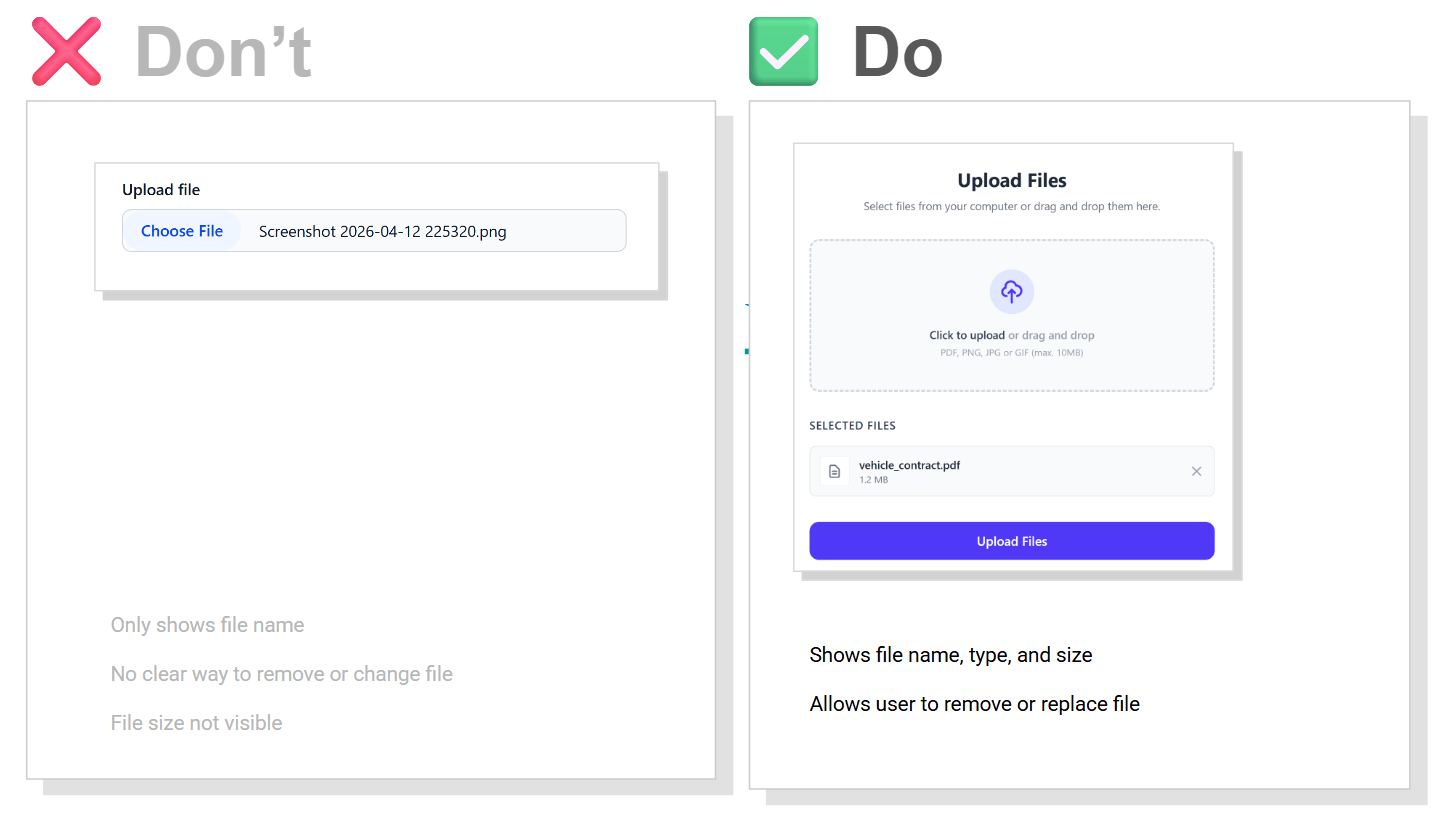
Do vs Don't File Upload example

Show a preview before users submit uploaded files. Include key details.

  • Display:

    • File name
    • File size
    • File type

Users should be able to remove or replace files easily before submitting.

Conclusion

User-friendly apps are built through small, thoughtful decisions.

Making navigation easier, avoiding unnecessary restrictions, and keeping the interface responsive all contribute to a better experience. These improvements may seem minor, but they significantly reduce user frustration and make your app more enjoyable to use.

Make VBCS application migration easier

These are some general tips for a VBCS developer to make changes in VBCS application before migrating to different instances.

Use connections based on backend. Instead of directly using a URL,

This way, when we migrate from one instance to another, we can make changes in backend URL and credentials. This will be one-time setup when me get a new instance and at code level, we don’t have to make many changes

Get Application URL using JS function

For any kind of link to different VBCS application, use JavaScript code to get application URL using

$application.path
// design url -- {{vbcs-cloud-url}}/ic/builder/design/khalil/1.0.0/preview/webApps/demo/
// live url -- {{vbcs-cloud-url}}/ic/builder/rt/khalil/live/webApps/demo/ 

Get SaaS URL using JS function

For any kind of link to different ERP instance for any deep link or report link to get the host name of SaaS application, configure the SaaS application as one of the backend and configure a get API

Using the get API, we can use the below JavaScript code to get full URL of API, from which we can extract the exact host name

Code sample for getting SaaS URL using Rest Helper

define(["vb/helpers/rest"], (Rest) => {
  "use strict";

  class PageModule {
    async getSaaSURL(arg1, arg2) {

      let apiURL = await Rest.get("jsonplaceholderTypicodeCom/getUsers").toUrl();

      // jsonplaceholderTypicodeCom --> this is service name
      // you can find this under Service Connections --> Overview --> Connection name 

      // getUsers --> this is endpoint name 
      // in above tab --> select endpoint and This is endpoint id 
      
      let hostName = new URL(apiURL).origin;

      console.log(apiURL); // https://jsonplaceholder.typicode.com/users
      console.log(hostName); // https://jsonplaceholder.typicode.com/
    }
  }

  return PageModule;
});

Use messages or static status like APPROVED, DONE, or some ID like -1, 0, 1, or 2024 using a constant value at the application level.

This will help to easily see all the values at one time and later, if there is change in actual value, we can change the value at this place with no need to change the code.

{
  "id": "demo",
  "description": "A new VB app",
  "defaultPage": "shell",
  "constants": {
    "SUCCESS_STATUS": {
      "type": "string",
      "defaultValue": "Successfully Created"
    }
  }
}
define(["vb/helpers/rest"], (Rest) => {
  "use strict";

  class PageModule {
    async checkStatus(status, APP_SUCCESS_STATUS) {
     // pass $application.constants.SUCCESS_STATUS
      return ( status === APP_SUCCESS_STATUS )
    }
  }

  return PageModule;
});

Getting time difference from now

Intro

Working with raw timestamps is not user-friendly.

Instead of showing dates like “2024-05-10 10:15:43”,
we can display them in a more readable way:

– 5 minutes ago
– 2 days ago
– in 3 months

This is called relative time formatting.

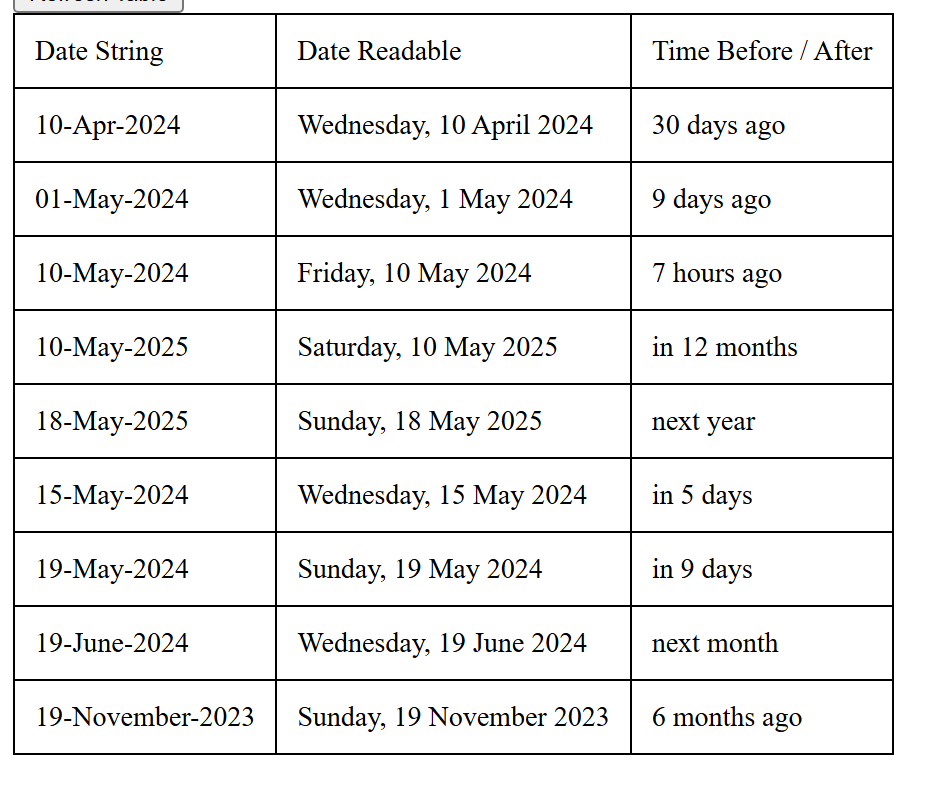
Example Ouput

let us say today is 15-Apr-2026 and we send the input date string, the api will return date readable

Input Date StringDate ReadableTime Before / After
10-Apr-2025Thursday, 10 April 2025last year
20-May-2025Tuesday, 20 May 202511 months ago
10-Mar-2026Tuesday, 10 March 2026last month
20-Mar-2026Friday, 20 March 202626 days ago
10-Apr-2026Friday, 10 April 20265 days ago
22-Apr-2026Wednesday, 22 April 2026in 7 days
10-May-2026Sunday, 10 May 2026in 25 days
20-May-2026Wednesday, 20 May 2026next month
10-Apr-2027Saturday, 10 April 2027in 12 months
20-Apr-2027Tuesday, 20 April 2027next year

Try it yourself

Enter any date and see how it converts into relative time.

How it works

We calculate the difference between the current time and the given date.

Then we convert that difference into units like seconds, minutes, hours, days, months, or years.

Finally, we format it into readable text like “2 hours ago” or “in 5 days”.

Code Example

function getTimeAgo(dateStr) {
  const relativeTime = new RelativeTime(); // defaults to OS localen  
  let dateObj = new Date(dateStr); 
  return relativeTime.from(dateObj);
}

We can use JavaScript to convert a date into a readable relative time format.

For example, “2024-05-10T01:25:14.317Z” is less readable than “7 hours ago”.

I have used the relative-time library to simplify this conversion:
https://github.com/yairEO/relative-time

Full code available here:
https://github.com/khalilahmed232/khalilahmed232/tree/main/plain/date-time-ago

This makes date display much more user-friendly in real applications.

Using relative time formatting makes applications feel more modern and user-friendly, especially for feeds, comments, and activity logs.